Docker is an application that simplifies the process of managing application processes in containers. Containers let you run your applications in resource-isolated processes. They’re similar to virtual machines, but containers are more portable, more resource-friendly, and more dependent on the host operating system.
01.Create a virtual machine in Oracle Cloud, this part is covered here
02. Update your existing list of packages: sudo apt update
03. Next, install a few prerequisite packages which let apt use packages over HTTPS:
sudo apt install apt-transport-https ca-certificates curl software-properties-common
04. add the GPG key for the official Docker repository to your system:
curl -fsSL https://download.docker.com/linux/ubuntu/gpg | sudo apt-key add –
05. Add the Docker repository to APT sources:
sudo add-apt-repository “deb [arch=amd64] https://download.docker.com/linux/ubuntu bionic stable”
06. Update the package database with the Docker packages from the newly added repo:
sudo apt update
07. Make sure you are about to install from the Docker repo instead of the default Ubuntu repo:
apt-cache policy docker-ce
08. You’ll see output like this, although the version number for Docker may be different:
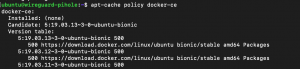
09. Finally, install Docker: sudo apt install docker-ce
10. Docker should now be installed, the daemon started, and the process enabled to start on boot. Check that it’s running: sudo systemctl status docker
11. The output should be similar to the following, showing that the service is active and running:
